


Kohl's - Shopping & More
4.845.56K Reviews
App Specs
- Version
- 26.8.5
- Updated On
- License
- Free
- Downloads
- 10,000,000+
- Developer
- Kohls
- Categories
- Shopping
- Platform
- Android, iOS
Screenshots


 Analysis by AppCompare
I find shopping apps most useful when they help me make a decision at the moment I actually need to buy something, rather than simply giving me another place to browse. That is the lens I use for Kohl's - Shopping & More: it brings Kohl’s shopping and savings tools onto a phone, but its usefulness depends on how comfortably you can stay connected while searching, checking offers, and completing an order.
When a connection matters most
Browsing and checkout are the moments when a reliable connection matters most. Product images, search results, store availability, account details, and payment steps all depend on information loading when you need it. I would plan to use the app while connected, especially before heading out to a store or relying on an offer at checkout. A screen that has not refreshed may not be a dependable way to judge what is currently available.
That makes the app better suited to deliberate shopping than to last-second decisions made in a weak-signal spot. If I am comparing clothing sizes or deciding whether a particular item is worth a trip, I would check the details before leaving home and allow the app to load fully. The extra minute is worthwhile: it reduces the chance of treating an old result or an unrefreshed offer as current.
A practical fit for errands and planned purchases
For a realistic use case, imagine I need a replacement household item and also want to look for a piece of clothing. At home, I can search by department, narrow the clothing results with filters, and check whether the item appears available at a nearby store. Before setting off, I can review the account and savings information I intend to use. That preparation gives the app a useful role in planning an errand, not just placing an order.
It is a natural fit for people who already shop at Kohl’s and want the retailer’s browsing, account, and offer tools together. Someone who buys there only occasionally can still use it for a specific search, but may not get as much value from reward tracking. If you mainly want to compare products across several retailers, a broader shopping app or the retailers’ own sites may be a better starting point than keeping your search inside one store.
Small habits that make mobile shopping easier
I would use filters early rather than scrolling through a long set of results. For clothing, choosing a size and color before comparing products can make the search more manageable; setting a price range can help keep a tempting deal from distracting me from the budget I had in mind. Search is still useful when I know the item, while browsing departments makes more sense when I am open to alternatives.
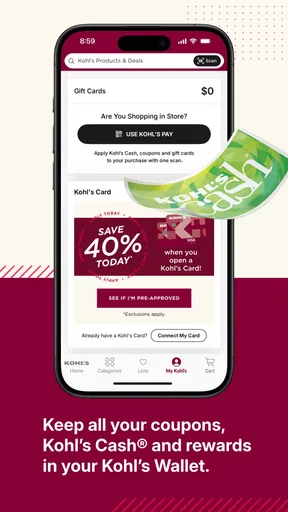
There is also a useful distinction between saving an offer and remembering to apply it. Keeping savings information in the app can make it easier to find than a paper coupon or an old email, but I would still review the available selections before checking out. A wallet can reduce the hunt for a deal; it cannot make every offer relevant to every purchase. I would treat rewards as a bonus on something I already planned to buy, rather than a reason to add items I do not need.
Worth Reading Before You Choose

Flipboard Shows What News Apps Must Do Beyond the Feed

Switching to Android Auto Means Rethinking Your Driving Routine

Google Calendar Makes a Crowded Week Easier to Manage

Ludo King Makes the Most of the Minutes Between Plans

Baby Panda World Brings Quick Play to Modern Phones, but Its Game Library Feels Busy

ESPN’s Live Game View Makes Following Close Games Easier
What to do if a screen stalls
Mobile shopping can be interrupted by a dropped connection, a slow page, or a change of plans. If a product page or cart stops responding, I would first check the connection and give the screen a chance to refresh before repeating an action. That is especially sensible during checkout, where tapping repeatedly can create uncertainty about whether a step went through. If I am unsure whether an order or payment action completed, I would check the account or order information before trying again.
For an in-store visit, I would avoid leaving offer and product checks until the moment I reach the register. Looking them up beforehand gives me more time to resolve a loading issue and to decide whether the trip is worthwhile. The app’s support and FAQ options can also be useful if an account or shopping question needs attention, although I would not treat a phone app as a substitute for having a backup plan when I am in a hurry.
Data, attention, and the trade-off
Product browsing is more comfortable when I have enough connectivity to load images and move between results, so I would save a long comparison session for a suitable connection rather than assume it will be convenient everywhere. I also try to keep shopping focused: search for the item, apply only the filters that matter, and leave the app once I have made a decision. That approach limits unnecessary browsing and helps me avoid buying something just because a promotion caught my eye.
As a free shopping app from Kohls, it has a clear advantage for people who want to shop that retailer’s assortment and keep its savings tools close at hand. It is less compelling if you want a single place to compare prices across competing stores, or if you do not want to maintain an account or revisit a retailer-specific rewards setup. The right choice depends less on how many offers appear and more on whether you already expect to shop at Kohl’s.
Who will get the most from it
The app is aimed at a broad audience: its content rating is Everyone, and its shopping scope includes apparel, beauty, and home categories. It has a 4.8 average from around 338,000 ratings, while more than 10 million installs suggest that many shoppers have tried it. Those figures indicate a widely used app, but my practical advice is still to judge it by your own habits: frequent Kohl’s customers have more reason to use the wallet and rewards tools than someone who only wants a one-off product search.
The app is free, and version 8.3.56 requires Android 9 or later. Kohl's released it on October 17, 2013, and the long-running product has a substantial body of user feedback, with around 45,000 reviews. I would check that my device meets the system requirement before installing. If I shop across different retailers, I would keep this app as a retailer-specific option rather than expect it to replace a general comparison service.
First Impressions and Navigating the App
Upon downloading the Kohl's - Shopping & More app, I was greeted with a clean and intuitive interface. The app is well-organized, making it easy for even the most tech-challenged among us to navigate without a hitch. From the home screen, you can quickly jump into shopping by category, check your rewards, or manage your account. It feels like having an entire Kohl's store right in your pocket—minus the long checkout lines.
Exploring the Features
One of the standout features is the app's ability to scan and store your Kohl's Cash, offers, and rewards. It's like having a personal shopper who remembers all the deals for you. No more fumbling through emails or paper coupons; everything you need is neatly stored under the "Wallet" tab. And let me tell you, the ability to stack up savings is a game-changer.
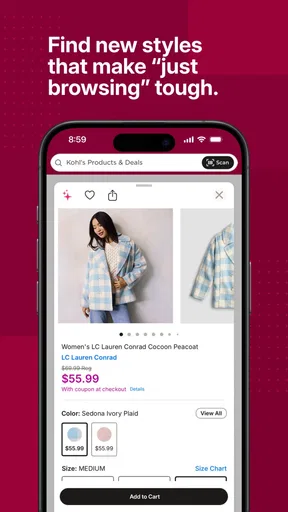
The app also offers a seamless shopping experience. You can browse by department or search for specific items using the search bar. I found the filter options particularly useful, allowing me to narrow down choices by size, color, brand, and even price range. It’s perfect for those moments when you’re on a mission to find that perfect pair of jeans without sifting through endless options.
Perks and Rewards
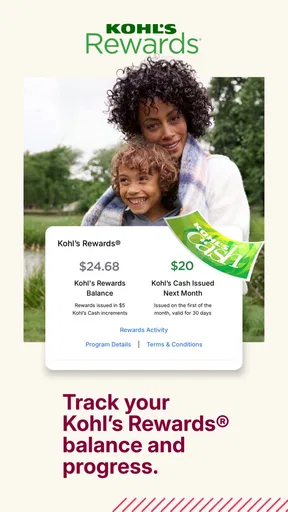
What's shopping at Kohl's without mentioning the beloved Kohl's Cash? With the app, you can easily track your earnings and redeem them directly at checkout. The app sends you reminders when your Kohl's Cash is about to expire, so you never miss out on using them. Trust me, there's no worse feeling than letting those precious dollars slip away.
Another cool feature is the "Yes2You Rewards" program, which is integrated right into the app. For every dollar you spend, you earn points that eventually translate into more savings. It's a sweet deal for regular shoppers and gives you that extra nudge to keep coming back for more.
Shopping Experience and Checkout
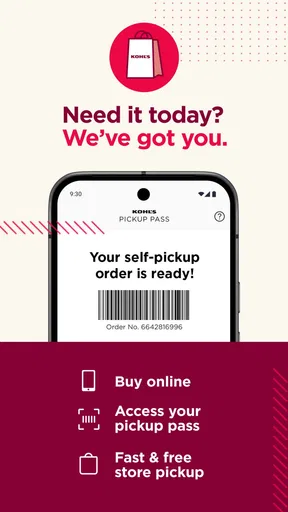
The shopping experience itself is smooth as silk. Adding items to your cart is a breeze, and the app even allows you to see what's available at your local store. This is perfect for those moments when you just can't wait for shipping and need to get your hands on that new outfit ASAP.
When it comes to checking out, the app offers multiple payment options, including your stored Kohl’s Cash and rewards. I particularly appreciated the guest checkout option for when you're in a rush or buying a gift. The entire process felt quick and hassle-free, which is exactly what I look for in a shopping app.
Customer Service and Support
No app is perfect, and sometimes you need a little help. The Kohl's - Shopping & More app has a built-in customer service feature where you can quickly contact support. I tested it out with a couple of inquiries and was pleasantly surprised by the prompt and helpful responses. You can also check the FAQ section for common questions, which is a nice touch.
Overall, the Kohl's - Shopping & More app delivers a fantastic shopping experience, blending convenience with savings. Whether you're a seasoned Kohl's shopper or just looking for a new place to score deals, this app is definitely worth a download. With its user-friendly interface, seamless shopping tools, and rewarding perks, it’s like having your very own shopping assistant.
So, if you're ready to streamline your shopping and maximize your savings, give the Kohl's app a spin. Who knows? It might just become your new favorite shopping companion.
Pros
- User-friendly interface enhances shopping experience.
- Exclusive discounts and offers available regularly.
- Easy access to order history and tracking.
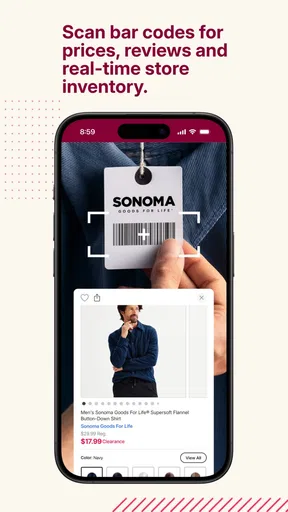
- Efficient barcode scanner for in-store shopping.
- Loyalty rewards program integrated seamlessly.
Cons
- Occasional app crashes during peak times.
- Limited payment options compared to competitors.
- Notifications can be overly frequent.
- Some features require a stable internet connection.
- Limited customer service options within the app.
FAQs for Kohl's - Shopping & More
What features does the Kohl's app offer?
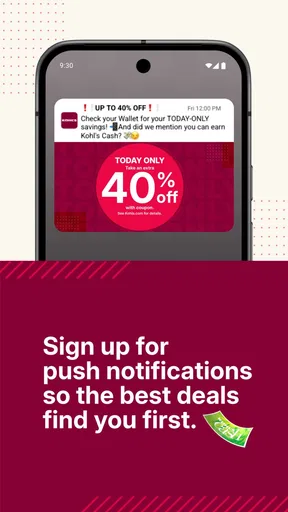
The Kohl's app provides a seamless shopping experience with features such as browsing and purchasing products, accessing exclusive discounts and promotions, managing your Kohl's Cash, and utilizing the price scanner for in-store shopping. Additionally, users can track orders and receive push notifications for sales and special offers.
Is the Kohl's app user-friendly?
Yes, the Kohl's app is designed to be user-friendly, with an intuitive interface that makes navigation easy. Whether you are searching for specific items, applying discounts, or managing your account, the app provides a straightforward and efficient experience for both new and seasoned users.
Can I use Kohl's Cash and coupons through the app?
Absolutely! The Kohl's app allows you to easily manage and apply your Kohl's Cash and coupons during checkout. You can store them in your wallet within the app, ensuring you never miss out on savings. The app also provides alerts when your Kohl's Cash is about to expire.
How secure is the Kohl's app for online shopping?
The Kohl's app prioritizes security by employing encryption and authentication measures to protect your personal and payment information. Regular updates ensure that security protocols are up-to-date, providing a safe and secure shopping environment for all users.
Does the Kohl's app offer customer support?
Yes, the Kohl's app includes comprehensive customer support options. Users can access live chat, email, or phone support directly through the app. Additionally, the app offers a detailed FAQ section to help resolve common queries and issues, ensuring a smooth shopping experience.


